
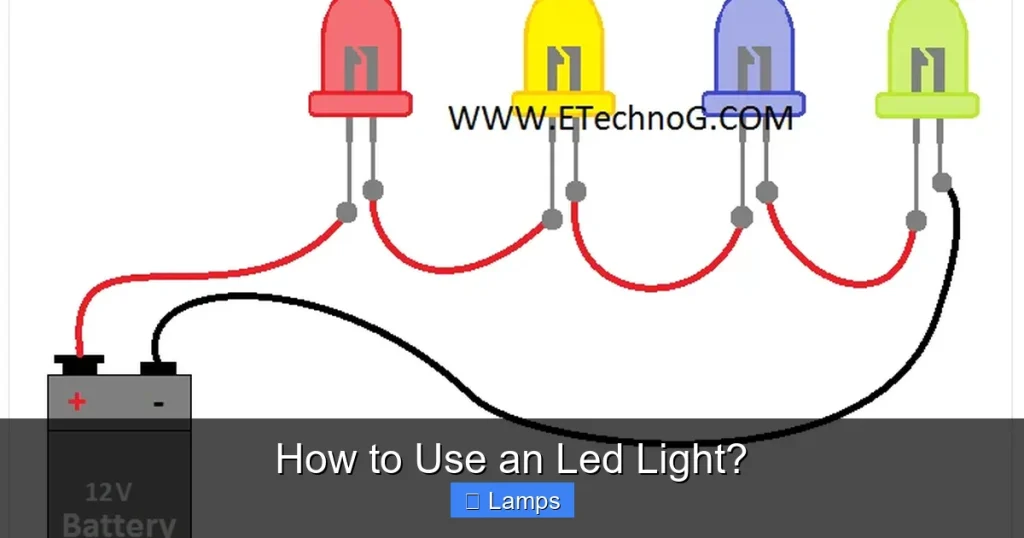
LED lights offer fantastic energy efficiency, long lifespan, and versatile lighting options for any home. This guide will walk you through everything from choosing the right LED light based on brightness and color to installing it correctly in various fixtures. You’ll learn how to utilize advanced features like dimming and smart controls, troubleshoot common issues, and ultimately enjoy the many benefits of modern LED lighting.
How to Use an Led Light?
Welcome to the bright world of LED lighting! If you’ve just purchased an LED light, or you’re thinking about making the switch, you’re in for a treat. LED lights are more than just bulbs; they’re a revolution in home illumination, offering incredible energy efficiency, long lifespans, and a vast array of colors and functionalities.
This comprehensive guide will walk you through everything you need to know about how to use an LED light effectively. We’ll cover how to choose the right LED light for your needs, step-by-step instructions for installation, tips for optimizing their use, and even some troubleshooting advice. By the end of this guide, you’ll be a confident LED lighting pro, ready to illuminate your home with efficiency and style.
Key Takeaways
- Understand LED Benefits: LED lights are highly energy-efficient, long-lasting, and offer superior light quality compared to traditional bulbs, making them a smart investment for your home.
- Choose Wisely Based on Lumens and Kelvin: Don’t just look at wattage; prioritize lumens for brightness and Kelvin for color temperature (e.g., 2700K for warm white, 5000K for cool daylight) to match your needs.
- Ensure Dimmability Compatibility: If you plan to dim your LED light, always select dimmable LED bulbs and ensure your dimmer switch is compatible with LED technology to prevent flickering or damage.
- Installation Varies by Type: While LED bulbs screw into standard sockets, LED strips and integrated fixtures require different, often more involved, installation steps, including power supply connections.
- Leverage Smart Features: Many LED lights offer smart capabilities like app control, voice activation, and color changing. Learn how to connect them to your smart home system for enhanced convenience and customization.
- Troubleshoot Common Issues: Familiarize yourself with solutions for common problems such as flickering, not turning on, or buzzing sounds, which often relate to dimmer compatibility or power issues.
- Optimize Placement for Function: Use LED lights strategically for ambient, task, or accent lighting to create the desired atmosphere and functionality in different areas of your home.
Quick Answers to Common Questions
What’s the difference between wattage and lumens for an LED light?
For an LED light, wattage indicates energy consumption, while lumens measure brightness. A higher lumen count means a brighter light, regardless of its low wattage. Always prioritize lumens when choosing for brightness.
Can I use any dimmer with an LED light?
No, not all dimmers are compatible with LED lights. You need a dimmer specifically designed for LEDs (often labeled “LED compatible” or “universal”) to prevent flickering, buzzing, or damage to your LED light.
How do I know if my LED light is warm or cool?
Look for the Kelvin (K) rating on the packaging. Lower Kelvin numbers (e.g., 2700K-3000K) indicate a warm, yellowish light, while higher numbers (e.g., 5000K-6500K) indicate a cool, bluish-white light.
Is it okay to leave LED lights on all the time?
Yes, LED lights are designed for long operating hours and are very energy-efficient. Leaving them on continuously won’t significantly impact their lifespan or your electricity bill, especially compared to traditional bulbs.
Can LED strips be cut to any length?
LED strips typically have designated cutting marks, usually indicated by a copper pad or scissor icon. You should only cut the strip at these specific points; cutting elsewhere will likely damage the circuit and make that section of the strip unusable.
Understanding LED Lights: Why Make the Switch?
Before we dive into the “how-to,” let’s quickly touch on what an LED light is and why they’ve become so popular. LED stands for Light Emitting Diode. Unlike traditional incandescent bulbs that create light by heating a filament, LEDs produce light through the movement of electrons in a semiconductor material. This process is incredibly efficient, generating very little heat and consuming significantly less power.
Here’s why people love them:
- Energy Efficiency: They use up to 85% less energy than incandescent bulbs, leading to substantial savings on your electricity bill. If you’re wondering how much electric does a lamp use, swapping to LEDs will drastically reduce that cost.
- Long Lifespan: LED lights can last 25,000 hours or more – that’s often 25 times longer than traditional bulbs. Less frequent bulb changes mean more convenience.
- Durability: Since they don’t have filaments, LEDs are more resistant to breakage from impacts or vibrations.
- Instant On: No warm-up time! LEDs reach full brightness instantly.
- Versatility: Available in a wide range of colors (white, warm, cool, RGB), dimmable options, and smart features, they fit almost any lighting need.
- Eco-Friendly: They contain no mercury, unlike CFLs, making them safer and easier to dispose of.
Choosing the Right LED Light for Your Needs
The first step to using an LED light is choosing the right one. With so many options, it can feel a bit overwhelming, but focusing on a few key factors will simplify your decision.
Consider the Type of LED Light
LEDs come in various forms:
- LED Bulbs: These are designed to replace traditional incandescent or CFL bulbs in existing fixtures. They come in standard shapes like A19 (classic bulb shape), BR (reflector), MR (spotlight), and more.
- LED Strips: Flexible strips of LEDs, often with adhesive backing, perfect for accent lighting, under-cabinet lighting, or creative DIY projects.
- Integrated LED Fixtures: Many modern light fixtures, such as recessed lights, chandeliers, or panel lights, have the LED components built directly into the fixture itself. This means you replace the entire fixture, not just a bulb.
- Smart LED Lights: These bulbs or fixtures can connect to your home Wi-Fi and be controlled via apps, voice assistants, or smart home hubs. If you’re looking for advanced control, exploring options like the best smart LED lamp might be a great starting point.
- Specialty LED Lights: This category includes grow lights, outdoor solar lights, light therapy lamps, and more, each designed for specific purposes.
Brightness (Lumens, Not Watts)
Forget watts when buying LEDs! Watts measure energy consumption, not brightness. For an LED light, you need to look at lumens. The higher the lumen count, the brighter the light.
General Equivalencies:

Visual guide about How to Use an Led Light?
Image source: images.theengineeringprojects.com
- 450 lumens = 40W incandescent
- 800 lumens = 60W incandescent
- 1100 lumens = 75W incandescent
- 1600 lumens = 100W incandescent
Think about the purpose of the light. Do you need bright task lighting for reading or cooking, or softer ambient light for a living room? For instance, when deciding what watt light bulb for a lamp, you’ll really be looking at lumens to achieve the desired brightness.
Color Temperature (Kelvin – K)
This refers to the “warmth” or “coolness” of the light, measured in Kelvin (K).
- Warm White (2700K-3000K): Similar to traditional incandescent bulbs, these lights have a yellowish hue, creating a cozy and inviting atmosphere. Ideal for bedrooms, living rooms, or dining areas.
- Neutral White (3500K-4100K): A balanced white light, good for offices, kitchens, or bathrooms where you need clear visibility without being too stark.
- Cool White/Daylight (5000K-6500K): Mimics natural daylight with a bluish-white tint. Excellent for task lighting, workshops, garages, or areas where alertness is desired.
Dimmability
If you want to control the intensity of your light, ensure your LED light is labeled “dimmable.” Not all LED lights are dimmable, and using a non-dimmable LED with a dimmer switch can cause flickering, buzzing, or even damage the bulb. Furthermore, make sure your dimmer switch is compatible with LEDs; older incandescent dimmers often aren’t.
Base Type and Size
For LED bulbs, check the base type (e.g., E26/E27 for standard screw-in, GU10 for spotlights) to ensure it fits your existing fixture. Also, verify the physical size of the bulb to ensure it fits within the fixture or lamp shade.
Smart Features
Decide if you want smart capabilities. These often include:
- Remote control via smartphone app
- Voice control (e.g., with Alexa or Google Assistant)
- Scheduling and timers
- Color changing (RGB)
- Integration with other smart home devices
Step-by-Step: How to Use an LED Light
Once you’ve chosen your LED light, it’s time to put it to use! The process varies slightly depending on whether you’re installing a bulb, a strip, or an integrated fixture.
Step 1: Unboxing and Inspection
Carefully unbox your new LED light. Inspect it for any visible damage. Keep the packaging and instructions in case you need them later for troubleshooting or warranty claims.

Visual guide about How to Use an Led Light?
Image source: 2r-bg.com
Step 2: Identifying the Right Fixture or Socket
Before installation, make sure the LED light is compatible with your intended fixture or power source.
For LED Bulbs
Ensure the base type (e.g., screw-in, bayonet) matches your lamp socket. Check the wattage equivalency and physical size to confirm it will fit and provide adequate light for the space. For example, when selecting a bulb for a best table lamp to light up a room, you’ll want to ensure it fits the shade and offers the right light output.
For LED Strips
LED strips often require a compatible power supply (transformer) to convert household AC power to the low-voltage DC power the strip uses. Make sure you have the correct voltage (e.g., 12V or 24V) and sufficient wattage for the length of your strip.
For Integrated LED Fixtures
These fixtures are designed to be wired directly into your home’s electrical system. Ensure you have the necessary electrical knowledge or consult a professional for installation.
Step 3: Installation Process
Safety first! Always turn off the power at the circuit breaker for the light fixture you’re working on before beginning any installation. This is critical to prevent electrical shock.
Installing an LED Bulb
- Turn Off Power: Locate the appropriate circuit breaker and switch it to the OFF position.
- Remove Old Bulb: Carefully unscrew the old bulb (if present). If it’s hot, allow it to cool first.
- Screw in New LED: Gently screw the new LED bulb into the socket clockwise until it’s snug. Do not overtighten.
- Restore Power: Flip the circuit breaker back to the ON position.
Installing an LED Strip Light
- Plan Placement: Decide where you want your LED strip. Clean the surface thoroughly to ensure the adhesive backing sticks well.
- Cut to Size (if needed): Many LED strips can be cut at designated marks (usually indicated by a copper pad or scissor icon). Only cut at these marks to avoid damaging the circuit.
- Connect Power Supply: Attach the LED strip to its compatible power adapter/driver. Ensure the polarity is correct (usually indicated by arrows or labels).
- Peel and Stick: Remove the adhesive backing and carefully press the strip onto your desired surface.
- Plug In: Plug the power supply into a wall outlet.
Installing an Integrated LED Fixture (Basic Example)
Note: This is a general overview. Always follow the manufacturer’s specific instructions. If uncomfortable, hire an electrician.
- Turn Off Power: Crucial step at the circuit breaker.
- Remove Old Fixture (if any): Disconnect wiring and carefully remove the existing light fixture.
- Mount Bracket: Attach the mounting bracket (usually included) to the junction box in the ceiling or wall.
- Connect Wiring: Carefully connect the fixture’s wires to your home’s electrical wires (usually black to black, white to white, ground to ground) using wire nuts.
- Secure Fixture: Mount the new LED fixture to the bracket, ensuring it’s secure.
- Restore Power: Turn the circuit breaker back on.
Step 4: Powering On and Testing
Once installed, turn on the light switch. Your LED light should illuminate instantly. If it’s a smart LED, proceed to the next step for configuration.
Step 5: Utilizing Advanced Features (if applicable)
Dimming
If you have a dimmable LED and a compatible dimmer switch, simply adjust the dimmer to achieve your desired brightness level. If you experience flickering, buzzing, or poor dimming range, your dimmer might not be fully compatible.
Color Changing
For RGB (Red, Green, Blue) LED lights, you’ll typically use a remote control or a smartphone app to cycle through colors, create custom scenes, or adjust white light temperatures.
Smart Control (Apps, Voice Assistants)
If you have a smart LED light:
- Download App: Install the manufacturer’s dedicated app on your smartphone or tablet.
- Pair Device: Follow the in-app instructions to connect your LED light to your home Wi-Fi network. This usually involves putting the light into “pairing mode” (often by quickly turning it on/off several times).
- Integrate with Voice Assistant: If desired, enable the LED light’s “skill” or “action” in your Amazon Alexa, Google Assistant, or Apple HomeKit app. You can then control your lights with voice commands like “Alexa, turn on the living room light” or “Hey Google, set the kitchen lights to warm white.”
- Explore Features: Use the app to set schedules, create lighting scenes, group multiple lights, and customize colors or brightness.
Step 6: Optimizing Placement and Usage
Where and how you use your LED light can significantly impact the ambiance and functionality of a space. Consider these common lighting types:
Task Lighting
Bright, focused light for specific activities. Examples include under-cabinet LED strips in a kitchen, a desk lamp with a bright LED bulb for reading, or a spotlight for hobbies. For example, when considering how to choose lamps for a living room, you might opt for a floor lamp with a bright LED to serve as task lighting next to a reading chair.
Ambient Lighting
General illumination that provides overall brightness to a room. This often comes from ceiling fixtures, recessed lights, or wall sconces equipped with LED bulbs.
Accent Lighting
Used to highlight specific features like artwork, architectural details, or plants. Lower lumen LED spotlights, puck lights, or strategically placed LED strips are perfect for this.
Maintenance and Care for Your LED Light
LED lights are largely maintenance-free due to their long lifespan. However, a little care can keep them looking and performing their best:
- Cleaning: If your LED bulb or fixture gets dusty, ensure the power is off and gently wipe it with a soft, dry, or slightly damp cloth. Avoid harsh chemicals or abrasive cleaners.
- Ventilation: While LEDs produce less heat than incandescents, they still generate some. Ensure they are not in enclosed fixtures unless explicitly rated for them, as excessive heat can shorten their lifespan.
Troubleshooting Common LED Light Issues
Even with their reliability, you might encounter a few hiccups. Here’s how to address common LED light problems:
LED Light Not Turning On
- Check Power: Ensure the light switch is on and the circuit breaker hasn’t tripped.
- Secure Connection: If it’s a bulb, gently re-tighten it. For integrated fixtures or strips, check wire connections (with power off, of course!).
- Test Another Bulb/Fixture: Try a known working bulb in the same socket to rule out a faulty fixture. If the fixture works with another bulb, your LED light might be faulty.
Flickering LED Light
- Dimmer Incompatibility: This is the most common cause. Ensure your LED is dimmable and that your dimmer switch is specifically rated for LED lights. Upgrading your dimmer often resolves this.
- Loose Connection: Check if the bulb is screwed in tightly.
- Faulty Wiring: If the flickering persists and is widespread, consult an electrician.
Incompatible Dimmer
Older dimmers designed for incandescent bulbs may not work correctly with LEDs. They require a certain minimum load that an LED bulb often doesn’t meet. Replace your old dimmer with an LED-compatible dimmer switch for optimal performance.
Buzzing Sound
A buzzing LED light often points to dimmer incompatibility. The electronics in some non-LED dimmers can cause interference with the LED driver, leading to audible noise. Again, switching to an LED-compatible dimmer is usually the solution.
Conclusion
Using an LED light is a straightforward and rewarding experience that brings modern efficiency and versatility to your home. By understanding the key features like lumens and color temperature, choosing the right type for your needs, and following simple installation steps, you can confidently illuminate any space. Remember to leverage smart features if you have them and don’t be afraid to troubleshoot minor issues. Embrace the brilliance and energy savings of LED lighting – your home and your wallet will thank you!

